
练习使用scrapy框架抓取图虫图片
元旦假期,天干物燥,寒风刺骨,不宜外出。黄历上好像是这么说的,嗯, 准没错。
所以在家三天不出屋。。。。
以上都是借口,其实就是懒,就是宅
整好在熟悉一把Python的爬虫框架scrapy。这篇文章不是教程, 只是我在练习过程中出现的一些问题的记录, 如果你想学习scray框架的话,请移步其他网站文章.或者直接查看scrapy官方文档.
目录
爬取前准备
图虫的相关图片都是按照Tag的方式进行组织的, 所以我们很容易就可以根据标签进行某类图片的爬取。
下面是图虫的入口页面图虫入口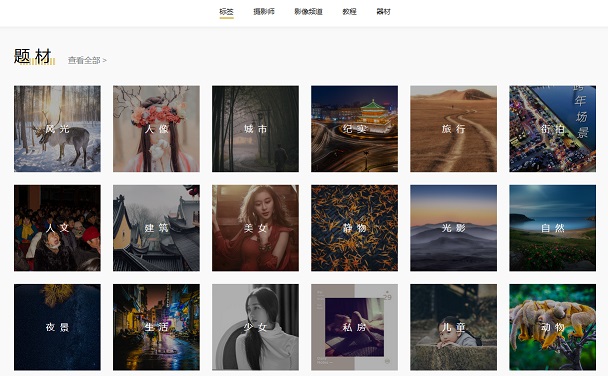
爬去入口
每个标签或专题页面采用的是JS动态翻页,我们可以通过WEB工具的网络功能,或者fidder查看对应的请求.
获得如下接口请求地址:https://tuchong.com/rest/tags/%E8%87%AA%E7%84%B6/posts?page=1&count=20&type=hot
可以看到, 有几个可用的参数:
- tags
- page
- count
- type
由此我们可以得到分页的接口数据如下图所示这个是列表页的基本数据信息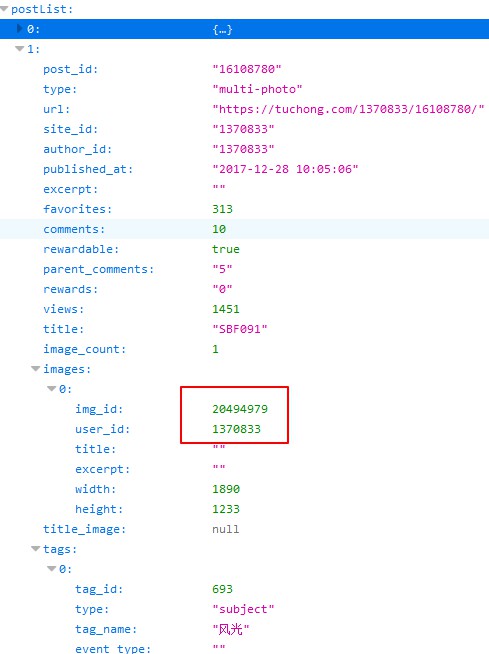
返回的JSON数据中每个post节点下都有一个images数组,如果数组中有对个值表示,这个是一组套图.
因此我们可以根据 images 节点,循环并获取相应的套图。
原图地址分析
由于列表页是缩放后的图片, 所以我们只能手动查看并归纳原图文件的路径规则.
也许哪一天规则就变了也说不上但是目前还是可用的。
规则如下:
缩略图
规则 :https://photo.tuchong.com/+ author_id +/g/+ img_id +.jpg如:https://photo.tuchong.com/1370833/g/20494979.jpgauthor_id是图片作者的编号,img_id是图片编号原图
规则 :https://photo.tuchong.com/+ author_id +/f/+ img_id +.jpg如:https://photo.tuchong.com/1370833/f/20494979.jpgauthor_id是图片作者的编号,img_id是图片编号
代码编写
创建爬虫
# 创建项目 |
相关代码编写
tuchong.py 演示代码, 代码未实现翻页,只取了一页数据。
class TuchongSpider(scrapy.Spider): |
我在定义的Item有三个字段, 这里只取了接口JSON数据中的author_id和img_id 按照上面的分析的规则,拼装了图片的大图路径。
Item定义:class TuchongprojItem(scrapy.Item):
# define the fields for your item here like:
authorId = scrapy.Field()
imageId = scrapy.Field()
imageLink = scrapy.Field()
接下来就是定义pipeline处理相关数据了class TuchongprojPipeline(ImagesPipeline):
def get_media_requests(self, item, info):
imglink = item['imageLink']
# print(imglink)
yield scrapy.Request(imglink)
def item_completed(self, result, item, info):
# print(result)
# [(True, {'url': 'https://photo.tuchong.com/1660246/f/9281459.jpg', 'path': 'full/e8876e7547c166d58876c3fce547d6819d8bf031.jpg', 'checksum': 'd78e6ba1115ae956878bdc630173ea7a'})]
# 取出图片存放的地址
author_id = item['authorId']
img_id = item['imageId']
patharr = [x["path"] for ok, x in result if ok]
path = patharr[0]
# 文件重命名(原地址,新地址)
os.rename(images_store + path, images_store + "full/" +
str(author_id) + "-" + str(img_id) + ".jpg")
return item
由于要处理图片数据,我们使用scrapy提供ImagesPipeline进行图片处理.
重写ImagesPipeline里的两个方法:get_media_requests方法, 主要负责发送图片获取请求, 这里我们将我们拼装的图片大图地址传递给Request进行图片处理.
item_completed方法, 这里主要用来对下载回来的图片进行重命名处理. 我们的命名规则是 author_id+'-'+img_id, 这样便于我们进行排序 ^_^
使用ImagesPipeline 我们需要制定图片的存放地址,同时我们需要启用当前pipeline
settings.py# Configure item pipelines
# See http://scrapy.readthedocs.org/en/latest/topics/item-pipeline.html
ITEM_PIPELINES = {
'TuchongProj.pipelines.TuchongprojPipeline': 300,
}
# 爬取图片后图片存放的位置
IMAGES_STORE = "F:/_tuchong/fengjing/"
好了, 爬虫差不多了,运行下试试吧!
scrapy crawl tuchong |
相关问题
接口请求不成功或返回的数据为空
UserAgent问题.
自定义UserAgent,在settings.py修改UA# Crawl responsibly by identifying yourself (and your website) on the user-agent
USER_AGENT = 'Mozilla/5.0 (Windows NT 10.0; WOW64) AppleWebKit/537.36 (KHTML, like Gecko) Chrome/65.0.3294.6 Safari/537.36'请求过快,相应不过来
限制并发数,增加延迟时间# Configure maximum concurrent requests performed by Scrapy (default: 16)
CONCURRENT_REQUESTS = 1
# Configure a delay for requests for the same website (default: 0)
# See http://scrapy.readthedocs.org/en/latest/topics/settings.html#download-delay
# See also autothrottle settings and docs
DOWNLOAD_DELAY = 5
本机没有图片处理相关库
No module named ‘PIL’
安装Pillow库pip install pillow
其他
自己写爬虫,纯粹就是玩票。
我们自己写爬虫,去爬取别人的数据, 尽量将并发降低,不要给站点造成骚扰。
如果可以尽量按照爬虫协议来爬取应允的内容。
附 图虫的爬虫协议# Robots.txt file from http://www.tuchong.com
# All robots will spider the domain
User-agent: YandexBot
Disallow: /
User-agent: MJ12bot
Disallow: /
User-agent: Purebot
Disallow: /
User-agent: psbot
Disallow: /
User-agent: *
Disallow: /admin/
Disallow: /api/
相关学习资料